Setting up NTP for a test environment
Overview
RioRey filter devices depend on accurate, synchronized time in order to function and report correctly. The standard default for rWeb and all other filter devices is to point to RioRey's public time servers.
When testing, you may want to operate in an environment that is closed and has no access to the rest of the Internet. In such cases, you will need to have another NTP server configured in your local test environment.
Setup
For Linux environments- Configure ntpd to run as a standalone server. There are many tutorials for this on the internet.
For Windows environments- Do NOT use w32time/w32tm.exe. Microsoft by its own admission does not support this as a full-featured NTP solution. A better option for Windows is to install and run Meinberg's NTP solution:
- Disable Windows Firewall entirely.
- Download installer: http://www.meinbergglobal.com/download/ntp/windows/ntp-4.2.6p5@london-o-lpv-win32-setup.exe
- Run installer
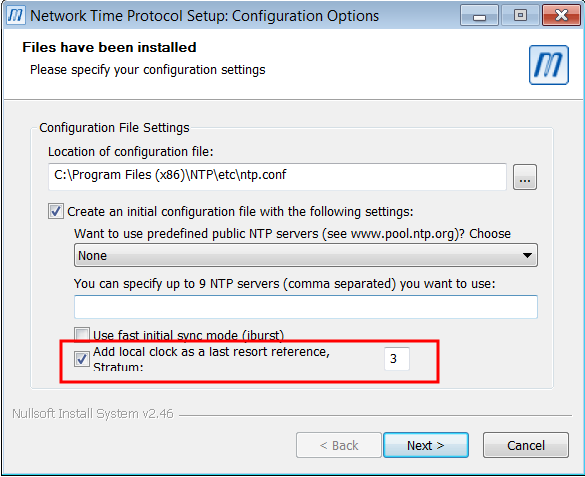
- Select 'Add local clock as a last resort reference'. Set Stratum to '12' and click 'Next'
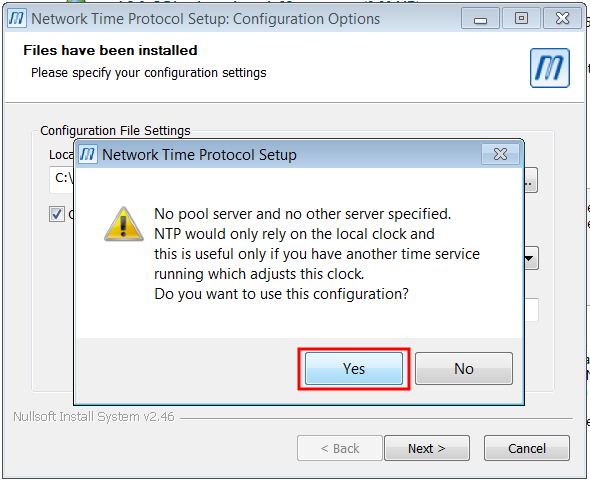
- Select 'yes' here
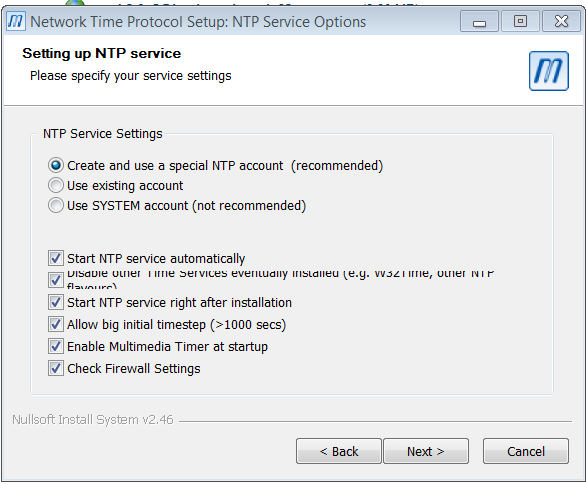
- Use default settings here - should look like this:
- Keep hitting 'Next' until you reach 'Finish', then click that.
rWeb and Device Configuration
Once your NTP server is up and running, make sure that rWeb and all associated devices are pointing to the IP address of your new NTP service. You will only have one entry for both rWeb and the filter device in their NTP sections.