Zone Routing Tab
In rWeb, routing is managed on a per zone basis. Each zone has a dedicated Zone Control Panel with a Routing tab for that zone. Newly added zones do not have assigned default IP(s)/Subnet(s) or RioRey device(s). After adding a zone to the "Group and Zone" list, the user must define the zone's routing information in order for the zone to become active in rWeb. For step by step instructions on setting up routing, please see Steps to Configuring a Group and Zone in rWeb.
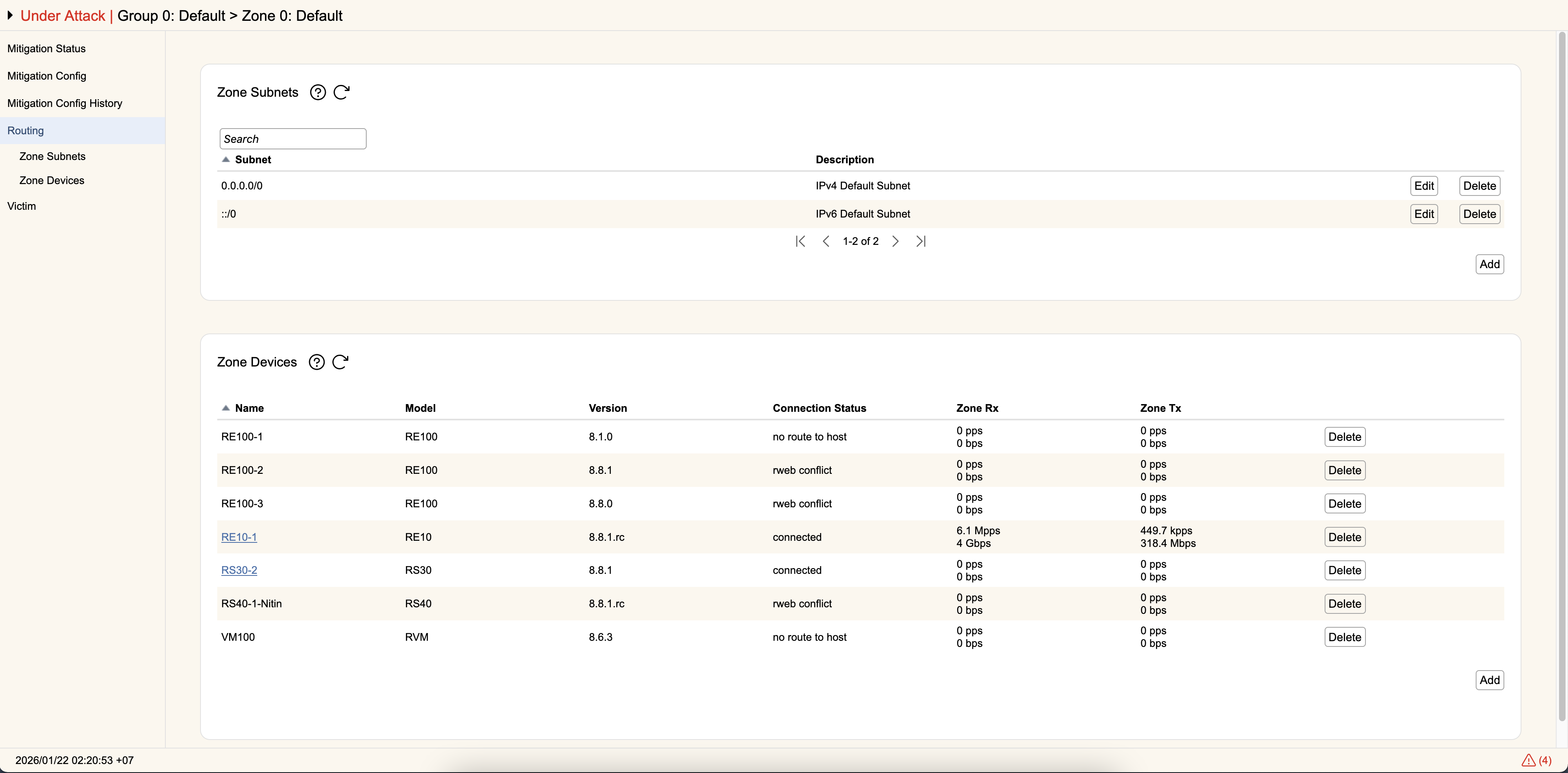
Zone Subnets
This section shows all of the subnets currently assigned to this zone. This can be configured from the Zone selector area or by using Add, Edit, and Delete to add additional entries. If the Group that owns this zone has routing restrictions applied, you will not be able to add subnets outside of your allowed address ranges.
GRE packets will be unwrapped and analyzed based on their innermost packets. If using GRE tunnels, please be aware you may need to specify tunneled destination subnets in a zone if you don't want the tunneled traffic handled by the Default Zone. Starting in RIOS 8.7.0, you can disable this behavior to have devices handle traffic based on the outermost packet layer instead. When doing so, it's highly recommended you configure all devices the same way so you don't have different behavior between units.
Zone Devices
This section lists all of the devices that will use this zone configuration.