Routing
The Routing page is used to assign specific subnets and devices to groups.
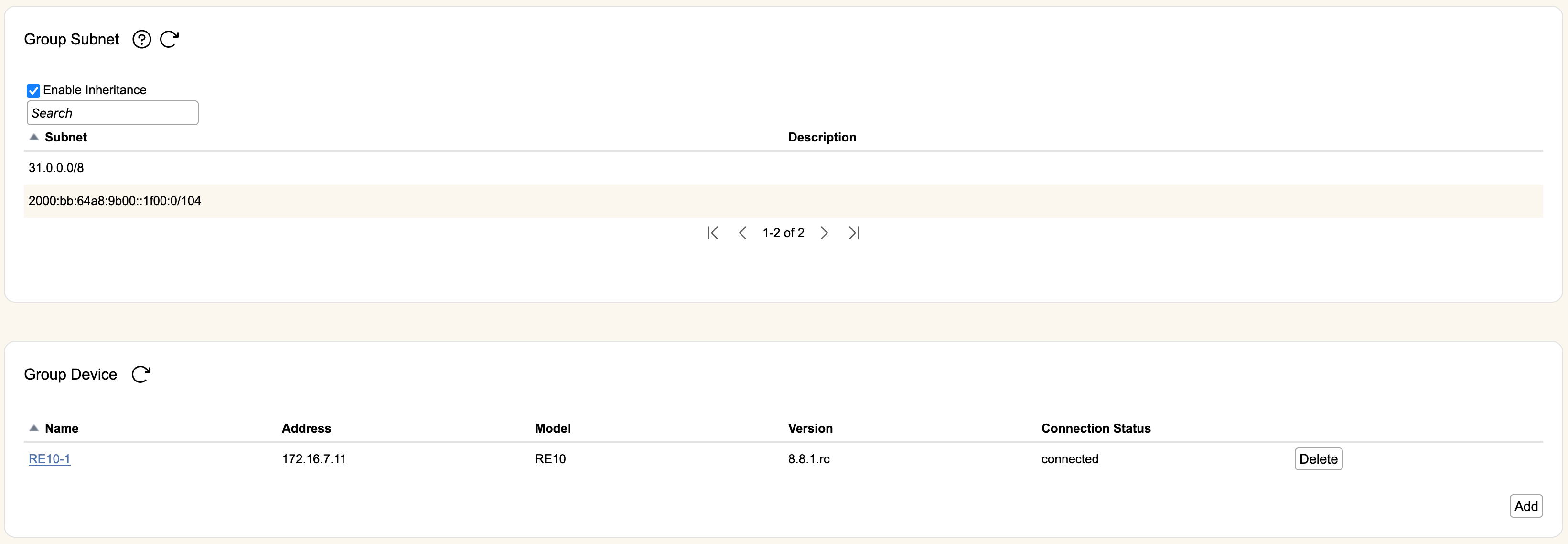
Group Subnet
Only subnets shown here may be assigned to zones owned by the group. For example, if you assign a /24 (IPv4) to the group, you could split it into two zones, each with a /25 from that /24.
The Enable Inheritance checkbox determines whether or not the group will inherit the routes of its parent group automatically:
- If checked, the group is automatically configured with the routes of its parent, and the Add, Edit, and Delete buttons will be removed.
- If unchecked, the group routes must be manually entered.
If Enable Inheritance is unchecked, hit Add to bring up a new popup box that will let you add one or more routes (comma or newline separated) plus a description. Routes without a specified prefix will default to /32 for IPv4 and /128 for IPv6. Newly added routes will be shown in the table.
Hit Edit on an entry to change either its subnet or description. Hit Delete to remove entries entirely.
Group Device
Devices associated with the group will automatically get configured with the zones owned by that group. Groups can be restricted to subsets of devices as required by your networking architecture.
The table shows all devices currently assigned to the group. It lists device Name, Address (or hostname if using that to connect), Model, current RIOS Version running, and Connection Status.
Hit Delete to remove the device from the group. Hitting Add will bring up the list of available devices in rWeb that are not already part of the group. Select them with the checkbox and hit Save to add them to the group or Cancel to close the device selection section.
The Default Group / Default Zone is associated with all devices automatically, so that there is always at least one zone controlling device filtering policy. As a result, devices cannot be removed from the Default Group.