Top Attacker
The Top Attacker section lets you view current or historical data on the biggest attackers within a zone.
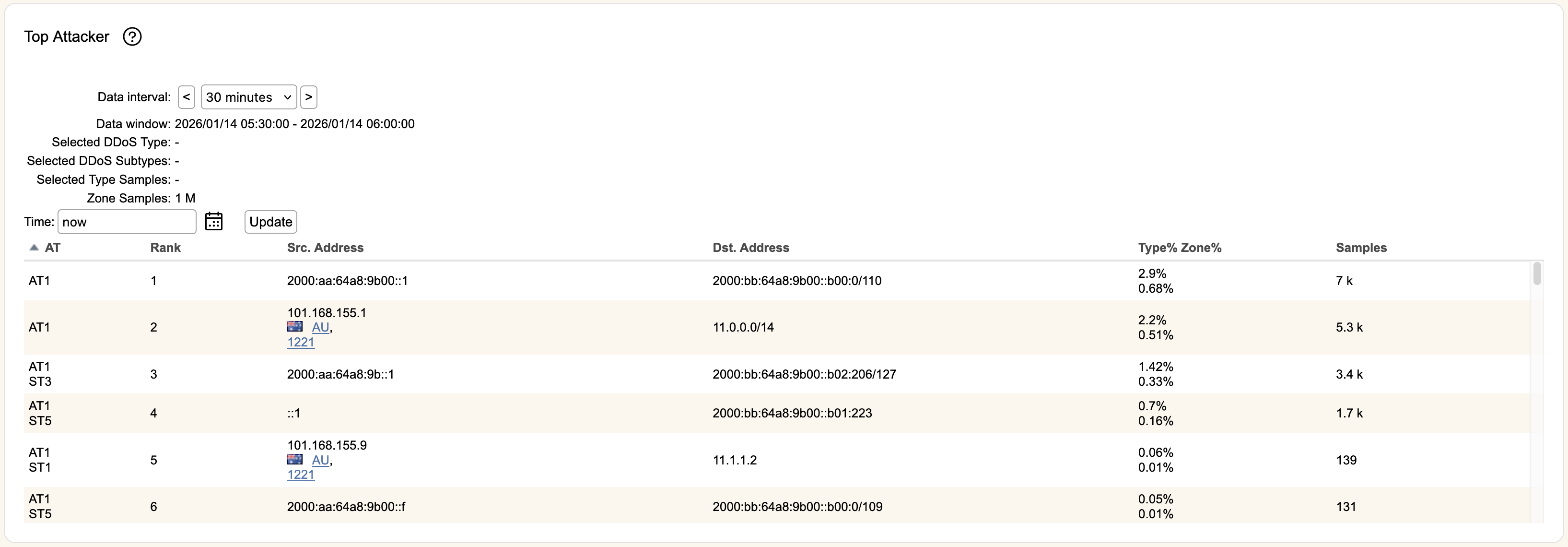
IP Addresses in the above image were synthetically generated.
Time is the time period used to populate this section. You can use the icon to select a specific date and time, or you can write an entry in the format "X year/month/week/day/hour/minute ago", or use now to indicate current time. Once you've entered information, hitting Update will refresh the table.
Data interval defaults to a 30 minute sampling window, but can be changed to 5 minute or 30 second reporting. Clicking the < or > buttons will increment or decrement the window in by the selected interval (versus entering a new timestamp in Time), with its time range shown in Data window.
AT represents the attack type used. Below that will be the subtypes observed by the attacker. Clicking on a row will provide a detailed description of the attack type and subtypes in the section above the table.
Rank rates the attacker within that attack type by number of samples.
Src. Address information shows the source IP of the attacker. You can click the blue hyperlinks under Src. Address to view AS or CC information if it is available for the given IP.
Dst. Address shows the aggregated destination of sampled packets for that attacker.
Type% and Zone% represents the amount of traffic represented by the Src. Address within the zone and selected attack type.
The number of packets captured for the attack is shown in Samples.