Victim Summary
The Victim Summary section lets you view current or historical victim IPs of attacks within that zone.
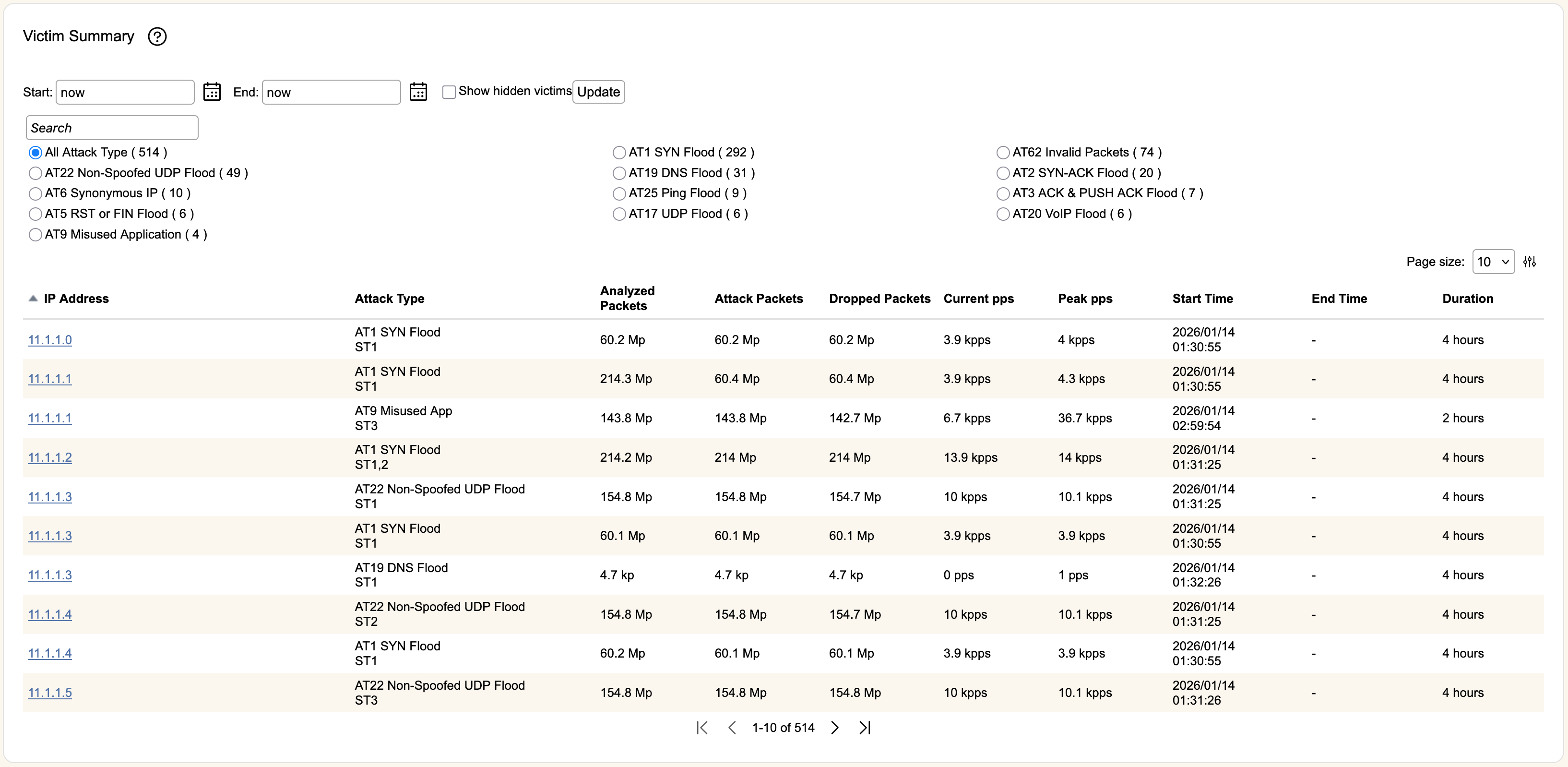
The IP addresses above were synthetically generated.
Start and End are the timestamps used to find victims. You can use the icons to select a specific date and time, or you can write an entry in the format "X year/month/week/day/hour/minute ago", or use now to indicate current time. Once you've entered information, hitting Update will refresh the table.
Select Show hidden victims will show ALL victims in the selected time period, as by default rWeb will not display victims who do not meet the configured notification threshold for the relevant attack type. For cases where there are a large numbers of victims and filtering this list would take too long, you may be prompted to search again with this setting enabled.
Each entry in the table will show the IP Address of the victim, the Attack Type reported and any relevant subtypes, the number of packets or size of the Attack, the number of packets or size of the packets which were Dropped from the attack, and the Start Time of the attack. Clicking Detail will bring you to the Zone Victim Tab allowing you to view more details about the attack.
The section above the table will populate a set of radio buttons based on the victims declared during the selected time period (showing attack type and number of victims). You can filter by specific attack type by clicking the relevant radio button. You can also filter this table by entering in the victim's IP address in the Search box above the All Attack Type radio button.