Understanding Billing Reports
Billing reports display a zone-based summary of traffic and attack information on a per-month basis for a given group (or a single selected zone).
Report Header
The header will include your customized logo and report name. It will also contain the name of the group or zone the reports was run on, "Billing Report" to identify the report, and the start and end times used for the data in the report. The start and end times, and all other timestamps used in the report, will be displayed in the timezone selected for the report.
Traffic Overview
The overview provides summary information for the group (or just the selected zone if run on a single zone) during the selected billing cycle.
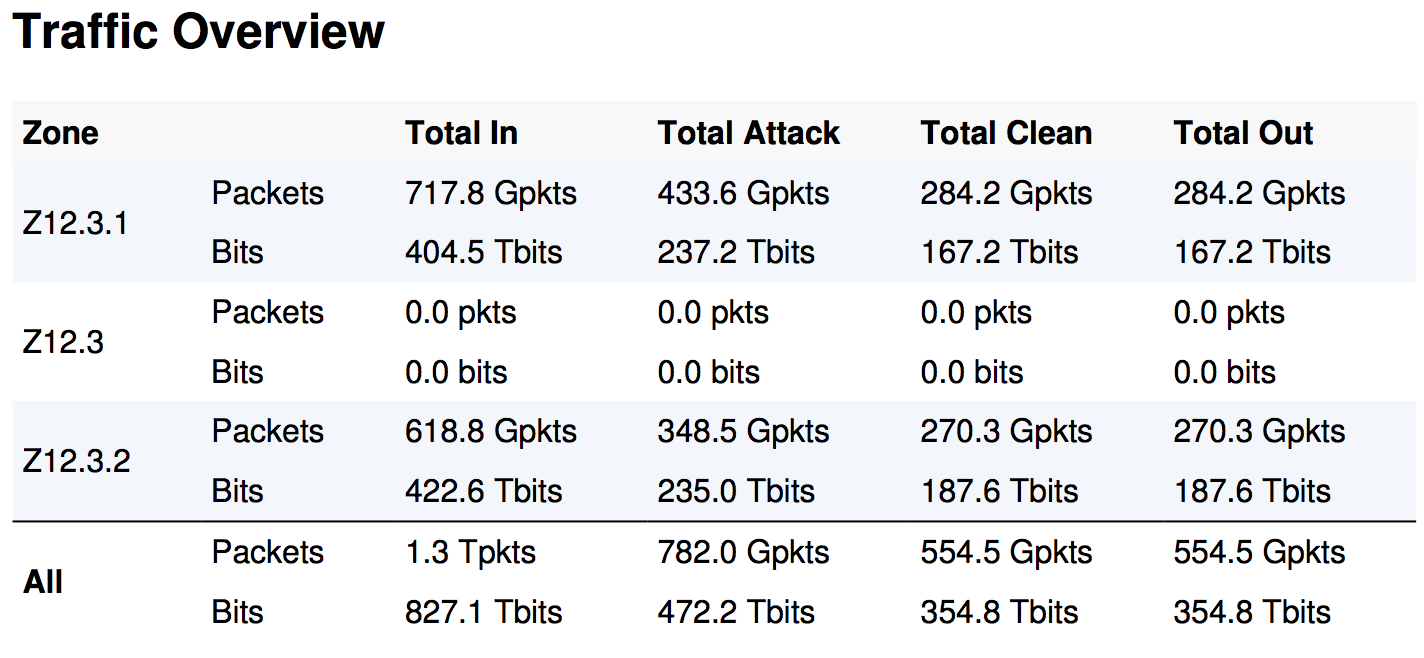 Each Zone's gross traffic volumes are listed individually next to their name in both packets and total bits.
- ALL- contains the sum of all traffic to the Zones for each category, and therefore the total traffic to the Group. If run on a Zone only, this will be the same as that Zone's values
- Total In- lists the total volume of traffic seen for the Zone.
- Total Attack- this is the volume of traffic which is deemed an attack.
- Total Clean- lists the volume of traffic that is not considered an attack.
- Total Out- this is the volume of traffic which is allowed to pass through the zone. This value could be greater than the Clean value if attack types are in monitor mode. In that case it will be detected as an attack but still allowed to pass through.
Attacks Within Report Window
This section will list all attacks that have an end time within the report window. This could be a long running attack that started in the previous month, or one entirely contained within the month of the report.
- Attack Type- The type of attack, according to the 25 Mitigation Methods.
- Total Attacks- The total number of attacks of this type.
- Total Attack Packets- The total number of attack packets of this type that were detected.
- Total Dropped Packets- The total number of attack packets of this type that were dropped.
- Total Attack Bits- The total number of attack bits of this type that were detected.
- Total Dropped Bits- The total number of attack bits of this type that were dropped.
Ongoing Attacks Started During Report Window
This section displays the same information as Attacks Within Report Window, but for attacks that have started within the report window but are still ongoing.
Network Traffic
Each Zone will also have a graph displaying its traffic in packets per second over the billing cycle. The graph will show In, Clean, and Out using best fit data sources.