Zone Management
RioRey filter devices each have differing capabilities in the amount of zones, block list, and allow list data they can handle. To see a summary listing of how much capability your device has and what it is using on the zones it is assigned to, go to Administration->Devices in the top right, and click on the name of the device you want to see. Then go to the Zone Management tab on the left sidebar.
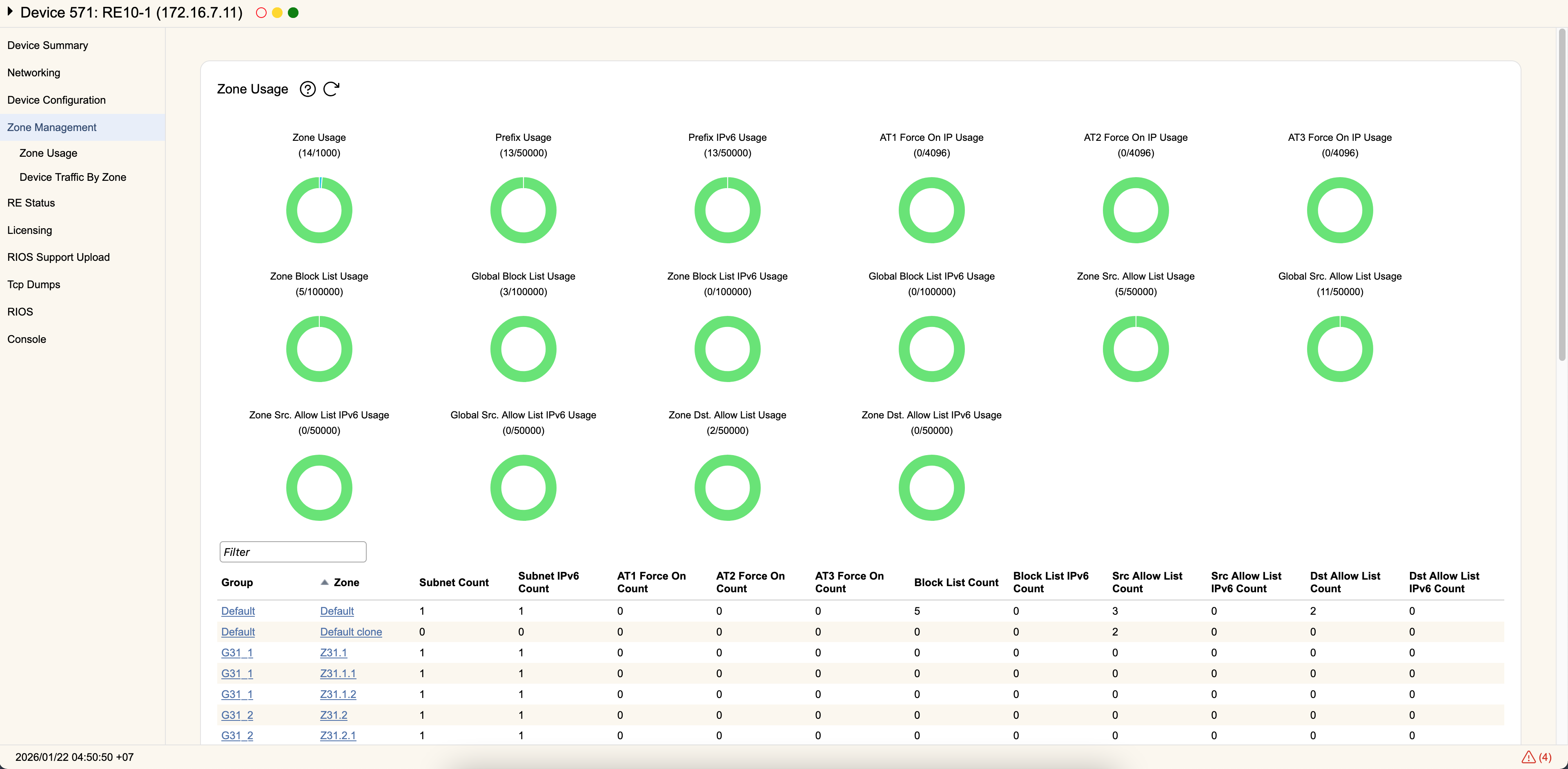
Zone Usage
This section shows the current usage of Zone specific information on your device. Each type of RioRey filter device has different limits on the amount of Zone configuration information it can store. IPv4 and IPv6 limits are the same, but tracked separately for each type of address.
| Device | Zone Limits | Prefix Limits | Block List Limits | Source Allow List Limit | Destination Allow List Limits |
|---|---|---|---|---|---|
| RE2K, RE4K | 50 | 5000 | 50000 | 5000 | 5000 |
| RS (all models), RX10, RE10, RVM/VM10 | 1000 | 50000 | 100000 | 50000 | 50000 |
| RE100 | 10000 | 100000 | 200000 | 100000 | 100000 |
You can see the device's current total usage, as well as the individual amount each Zone contributes towards that total. Each individual line shows the following information for each Zone associated with the device:
- Group- The configured Group for the Zone. Clicking the hyperlink will bring you to the Group configuration page.
- Zone- The name of the Zone. Clicking the hyperlink will bring you to the Mitigation Config Tab for that Zone. Each Zone counts against your Zone Usage for the device.
- Subnet Count- The number of subnets associated with that zone, seen under the Zone Routing Tab. Each subnet used counts against your Prefix Usage. The Default Zone does not contribute towards this count and is always enabled.
- AT 1/2/3 Force On Count- The number of IPs using Force On Mode. These are resource intensive, specific mitigation measures configured in a Zone under AT1, AT2, or AT3. The total count for each is shown under Force On IP Usage.
- Block List Count- The number of IPs currently being block listed in the Zone. The total count is shown under Block List Usage. This is tracked by IPv4, IPv6, and whether or not these entries are global.
- Src. Allow List Count- The number of IPs currently being source allow listed in the Zone. The total count is shown under Src. Allow List Usage. This is tracked by IPv4, IPv6, and whether or not these entries are global.
- Dst. Allow List Count- The number of IPs currently being destination allow listed in the zone. The total count is shown under Dst. Allow List Usage. This is tracked by IPv4 or IPv6 (there cannot global destination allow lists).
You can Filter the list of zones if you need to search for a specific Zone. You can also Add and Delete Zones associated with this device.
Device Traffic By Zone
This sections shows current traffic passing through the device for each configured Zone. This section is functionally equivalent to the Net Stats page, except the traffic reported is for this device only rather than the aggregate traffic of all devices associated with the Zone.