Tcpdump
rWeb is capable of configuring packet captures to run on RIOS devices using tcpdump. You can configure runs of tcpdump for one or more devices and then download the packet captures from rWeb afterward.
RIOS filter devices only examine traffic in the WAN to LAN direction, so any captures will only contain traffic going in this direction. This allows you to specify the type of traffic (All/Good/Attack Packets) but the capture will not be bidirectional.
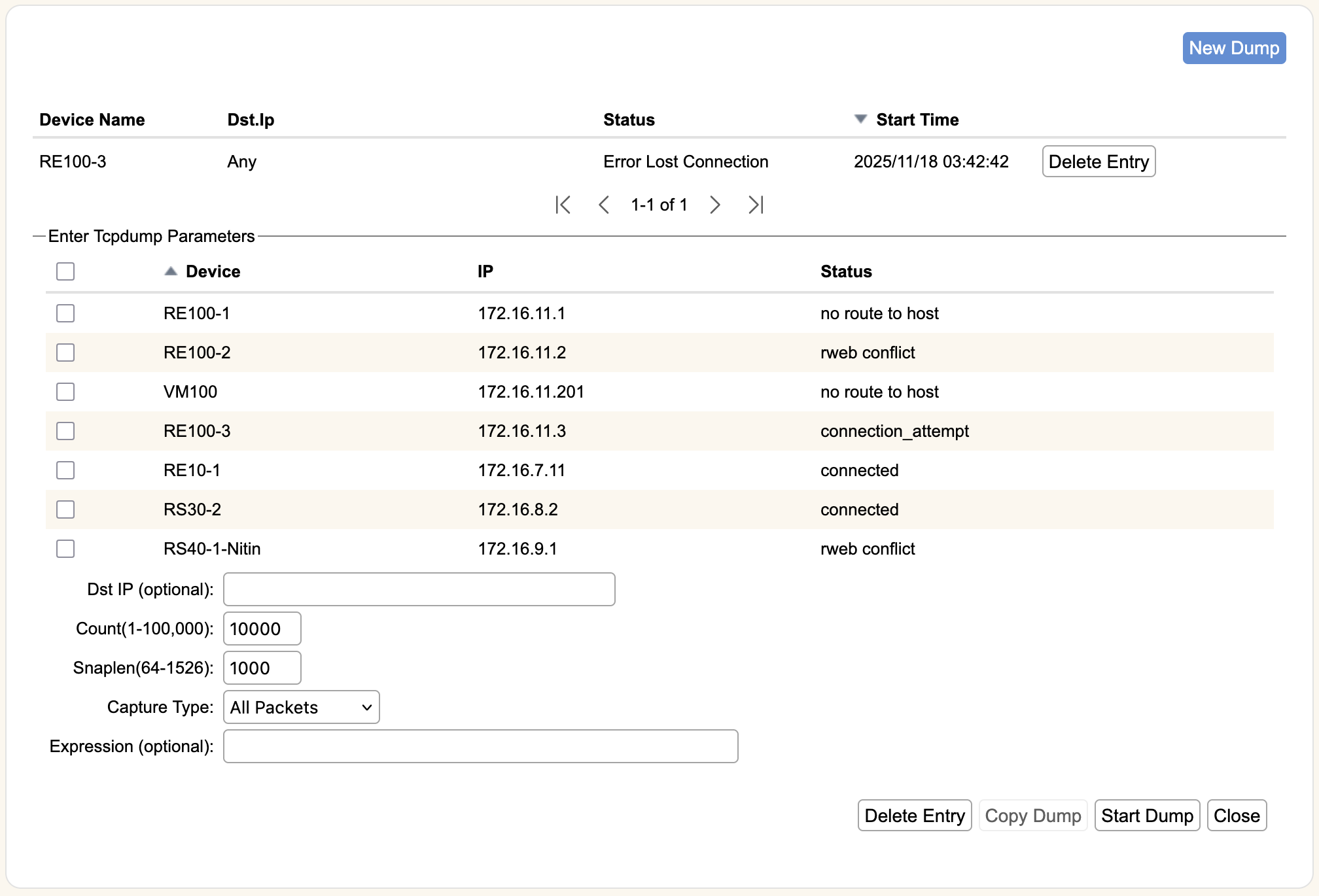
Dump Status
The top section displays all currently scheduled, running, and previously executed runs of tcpdump. Each entry will display the device on which the dump is running/ran, the destination IP of the captured traffic, the status of the dump, and the start time of its execution. If you started a tcpdump in error, you can hit Stop Dump to halt the process. Completed or failed dumps can be removed with Delete Entry. Successful dumps can be retrieved using Download.
Enter Tcpdump Parameters
When you hit New Dump, it will open this section for you to specify the parameters of the tcpdump. You can set up the parameters directly, or select and existing dump in the status screen above and hit Copy Dump to use the same settings as the selected dump.
- Devices- The top section will list all physical devices that are associated with the zone, by Device, IP, and current Status. You can select individual devices with the checkboxes or select all of them at once with the checkbox in the Device header section.
- Dst IP- The destination IP of the traffic you would like to capture. If the specified Device is running RIOS 5.3.0 or greater (or all devices for the zone if you've selected All), leaving Dst IP blank will capture all traffic in the zone. Otherwise, you must specify a destination IP/subnet.
- Count- The number of packets to capture. Defaults to 10,000.
- Snaplen- Snarf snaplen bytes of data from each packet. Defaults to 1000.
- Capture Type- The type of packets to capture. Options are All, Good, or Attack Packets. Defaults to All, which is RioRey's recommended setting for diagnostic purposes. Good will only capture traffic that is not flagged as attack traffic. Attack will only capture attack flagged traffic.
- Expression- This section is for tcpdump filter expression entry. You can further filter the packets captured using standard tcdump filter expressions, such as port 80 or port 443 to capture only traffic going to those ports.
The expression follows tcpdump standards. If you have VLAN tags in your traffic, capturing the right traffic can be trickier than you expect, especially if you have both tagged and untagged traffic. Make sure you know what you want to capture and use the vlan kewyord appropiately.